Photos come to you
Each place shows its first Google Maps photo everywhere it appears: in your collection and on the calendar. No searching, no saving images by hand.
Paste the Google Maps links you've been hoarding. VacationPlanner pulls in each place's name and photo. Then you drag them onto a week grid, hour by hour, day by day, and sync it with your calendar.
every block dragged into place · snaps to 15 min
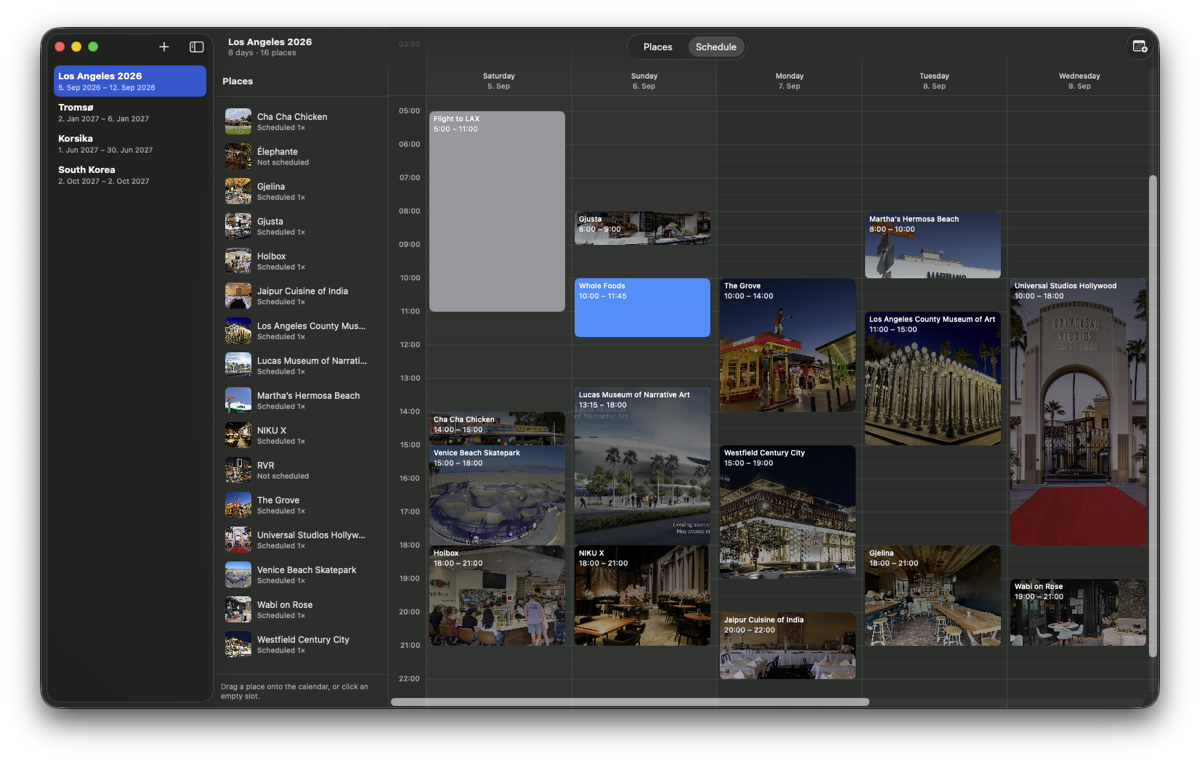
Copy any place in Google Maps, whether it's a restaurant, a museum or a beach, and paste the link. The app fetches its name, address and first photo for you.
Drop places on the week grid. Move them around, stretch their edges to change the duration. Everything snaps to 15 minutes.
Every visit shows its photo and time at a glance. Flights, drives and plain free time get their own colored blocks.
Each place shows its first Google Maps photo everywhere it appears: in your collection and on the calendar. No searching, no saving images by hand.
Keep as many vacations as you like, each with its own dates, places and schedule. Add ideas at any time, even mid-trip.
A flight, the drive to the hotel, a lazy morning: add them as named blocks in a color you pick, right next to the real places.
No account, no cloud, no tracking. Everything is stored on your Mac and stays there.
One click sends the whole schedule to any macOS calendar you choose. Sync again after changes and the existing events are updated, never duplicated. Items you removed disappear from the calendar too.
VacationPlanner is free. Download it, drag it into your Applications folder and start planning tonight.
Download for MacVersion 1.0.1 · macOS 15 or later · No account · No cloud